

Today we launched Muse — our personal agent. We’ve been working on and using Muse ourselves since early 2026. As soon as we started using it, we saw the glimmers of real personal superintelligence — an agent that knows you, actually does things, works in the background, launches swarms of subagents, builds its own tools, and edits itself.
It was also the first time we’d handed our inboxes, our calendars, and a shell to a piece of software and let it run unattended — which didn’t always work out as planned. Making this technology work for everyone requires careful design and engineering to operate more safely. That’s where most of the effort on this project went and this post explains our approach in detail.
We trained our model with a specific focus on the areas that are critical for an agent like this: zero-shot tool calling using CLIs and skills, long context, long-trajectory instruction following with inherent awareness of prompt injection, and multi-agent coordination.
No matter how strong the model is at the core, any agent like this will still make mistakes, and it will sometimes be attacked via the data it reads. So we designed the system to assume the agent may be under attack and limit the potential damage — the harness runs in its own isolated cell, it doesn’t see real credentials, and every interaction with the outside world runs through a Sentinel which the agent can’t override. Muse can and will still make mistakes, but we expect they’ll be much less frequent and cause much less damage due to the safety systems we’ve built in.
We’ve hardened Muse based on extensive dogfooding, agentic red teaming, and against issues found in real adversarial scenarios by security researchers in our private bug bounty program. Today, we’re opening the Muse bug bounty program to anyone to responsibly disclose issues. The program awards up to $300,000 for valid reports, including up to $130,000 for successful prompt injection attempts that affect one user.
By going into detail about how Muse works under the hood, we hope to give you a sense of how — and how much — you can trust it in practice. The following describes the system at launch. We will, of course, continue to pay attention to the changing threat landscape and make changes as required.
The Lay of the Land
An agent in your own cloud computer
You and your Muse share your own dedicated computer in the cloud. This is where your Muse lives and where all data and credentials for any service you connect are securely stored. Each Virtual Machine(VM) is an isolated linux box with a browser and enough storage, CPU, and memory to do real work — like compiling code the agent writes, developing custom skills and handling concurrent sub-agents and crons.
Your computer, your data
Your dedicated VM is the system of record for everything you put in Muse. Muse sends limited data out of the VM when necessary for inference and telemetry as described below.
Clients
Muse clients (the iOS and Android apps, the web UI) connect directly to your VM via a secure transport layer.
Connectors
Muse is most useful when you connect it to your email and other systems like your car or your home. We’ve built an initial set of connectors to third-party systems and to other Meta apps like Instagram and Facebook. For each connector, we worked closely with the service provider to integrate their API, and we’ve written and iterated on SKILLs — detailed instructions to Muse — on how to get the most out of each connector. Muse can also write its own custom connectors for other services you care about if they have their own APIs or CLIs.
Muse Secure VM
The VM is structured carefully to separate what you and your Muse do from everything we’ve built in to keep you safe using Linux isolation primitives. The right mental model is two isolated security domains on one box, not an LLM powered agent with root.
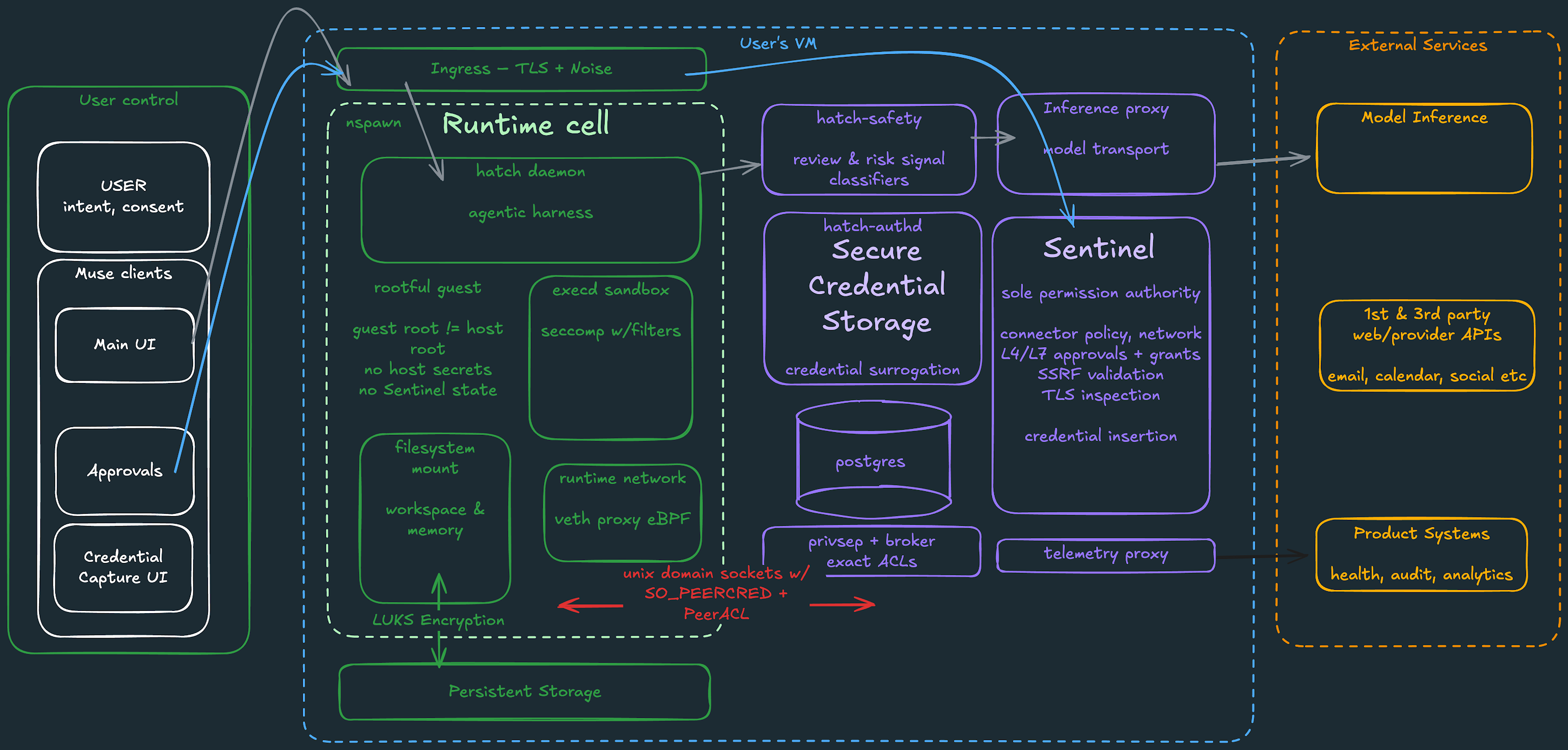
The Hatch1Hatch is our internal name for Muse in the codebase. daemon (the core agentic harness) as well as the filesystem containing your workspace and files, and all the binaries and tools Muse executes on your behalf operate in a systemd-nspawn runtime container. Root inside the runtime cell is mapped to an unprivileged host user so runtime cell root is not host root. The cell gets its own root filesystem (including a full debian image) separate from the host filesystem where your other more sensitive data lives. It also gets a virtual network interface, filtered system calls (for example no io_uring), and limited kernel capabilities (for example no CAP_SYS_PTRACE and no CAP_NET_ADMIN).
Security-sensitive services exist outside the runtime cell. This split is important as the runtime cell is expected to process untrusted data. These run as separate systemd units:
hatch-safetyoperates an independent set of models and classifiers which inspect requests and responses to/from core model inference. These are important for controlling frontier risk and to identify other threats such as prompt injection attempts. Running these outside of the runtime cell means that attackers cannot disable these protections.privsepworkers execute built-in connector code with tightly scoped privileges, keeping the connected credentials out of scope of the agent.hatch-authdis responsible for credential storage (including OAuth tokens for third-party services you choose to connect – these are stored in your VM, not in centralized Meta infrastructure) and for credential surrogation so your main agent never sees sensitive credentials.- Sentinel is the sole permission authority for connector actions and network egress.
- All durable application state is stored in a postgres database separate from the runtime cell and from the credential store.
- Proxies for inference and telemetry expose constrained paths to external infrastructure.
All communication between the runtime cell and other services in the VM happens via Unix domain sockets with SO_PEERCRED and peer ACLs. This provides kernel authenticated, least-privilege interprocess communication with no secrets to steal.
A Built-In Sentinel
Sentinel is a separate host-side agent from your Muse. It is the sole permission authority for approval to perform actions with connectors to third-party services and for all egress over the network. Muse proposes actions, but only Sentinel can grant permission to perform action.
Connectors
When Muse wants to take action via a connector, the relevant connector tool is invoked in the runtime cell. That submits a request to Sentinel describing the connector, which method is to be invoked, the class of action, its scope, and context of what the user asked for from which Sentinel generates a user-visible purpose for the request. Sentinel evaluates the connector policy, which has been set by the user, and decides whether the action should be allowed, denied, or to ask the user.
Network egress
Every concrete network request is governed by Sentinel at egress. Runtime traffic reaches Sentinel via a forward proxy configured with Linux networking controls (userns, veth boundaries and eBPF filtering). Sentinel can evaluate the destination at both layer 4 and layer 7: the hostname, the resolved and final destination IP address, the port, protocol, HTTP method, path, and the actual decoded request. SSRF restrictions prevent an apparently public hostname resolving private infrastructure after DNS lookup.
Sentinel also performs just-in-time credential insertion for any requests which need a secret or auth token. For all such requests, code in the runtime cell or a worker only ever sees a “surrogate” token, minted by authd. After the concrete network request is authorized, Sentinel will replace any surrogate tokens with the real credential, obtained from authd, at the network boundary. The agent never sees real tokens, which means any attempt to coerce the agent to reveal the actual secrets via prompt-injection or otherwise is futile.
To balance the signal-to-noise ratio of user approvals, Muse uses kernel-level data flow tracking, which we call “tainted egress.” Each tool execution process starts in a clean state and becomes tainted if it reads user data. Clean network requests that already qualify for a narrowly bounded auto allow policy — and which also pass other checks on the outbound URL — can be allowed through without bothering the user. Taint information is used to determine suitable user approval for requests. Tainted or unverifiable processes lose auto-allow and fall back to the normal approval flow. The implementation uses eBPF cgroup programs for network interception and process attribution, plus eBPF programs attached to Linux Security Module hooks we added for taint propagation.
Human in the Loop
When Sentinel’s decision resolves to ask the user, Sentinel creates a pending approval and execution stops. Sentinel sends that request directly to the Muse client, describing the exact action to be approved. A dialog is presented to the user directly within the client UI — not via their conversation with Muse — and their answer is routed directly back to Sentinel, which acts on the user’s decision. Sentinel then updates its authoritative approval state and allows the operation to proceed or rejects it as appropriate.
Approvals granted via the human in the loop system are strict capabilities, not conversational suggestions. They’re bound to the particular connector/destination and use case. Muse has support for obtaining one-time, session-scoped, task-scoped, time-bounded, or perpetual permission. Sentinel decides which grant types to present for the user to choose between and ensures that subsequent invocations match the granted scope exactly.
The point is not to ask the user about everything. Read-only, previously allowed, or demonstrably low-risk actions can proceed without interruption. The goal is to put friction where consent matters while keeping routine operations flowing freely. This balance is something we expect to tune over time as we have more experience with real users.
Least Privilege
Never showing API keys to the model is an example of how we apply the principle of least privilege. The model doesn’t need to see the API keys — so it doesn’t — which means it can’t accidentally leak them through some other vector. Muse applies this principle wherever possible. For example:
A lot of services support read and write operations. Users tend to be more comfortable giving their agent read access to their data (e.g., “read my calendar to flag conflicts to me”), and prefer to take time to understand how well the system works in practice before giving write access (e.g., “schedule new meetings for me”). Where the underlying service supports it, Muse separates out read and write access. Muse also provides fine-grained control over exactly which actions the agent can take on behalf of the user beyond the coarse groups that are usually exposed as OAuth scopes. (For example, if you grant Muse the Gmail read-access OAuth scope on the Gmail side, you can remove the ability to access Gmail settings that usually comes along with it). The system adds finer-grained controls at the connector, process, credential, and request levels.
A standard approach for agents like Muse is to have CLI-based connectors for third-party services which run in the same environment as the harness. A risk is that the agent could be coerced to change the tool code via prompt injection to do something nefarious with the service credentials those CLIs have access to. Muse achieves a greater degree of protection by running the logic for built-in connectors outside the runtime cell and with tightly scoped credential access using privsep.
Built-in connectors have CLIs which run in the runtime cell which simply parse their arguments, open any files the caller is already allowed to access, and pass typed arguments and file descriptors over a Unix socket. A systemd sandboxed worker then executes the business logic of the tool.
Each worker is identified by its cgroup and has explicit credential allowlists. A calendar worker cannot ask authd for an email credential simply by changing a request parameter.
- Privsep decides where credential capable code executes
Authddecides which credential material the authenticated caller can receive- Sentinel decides whether the requested action may be taken
The browser follows a similar pattern. CDP access is in a broker outside the runtime cell and the browser agent gets a narrow, controlled interface to it.
For built-in connectors, we also thought carefully about how to give Muse safer access given how deeply these services fit into your life. Think about your primary email inbox: You probably receive a lot of one-time token passcodes there. And your email account can likely be used to reset your passwords across most other accounts you use on the web by clicking on “forgot password” links. Connecting your email to Muse should not allow the agent or someone else coercing the agent to represent you across other sites. So Muse’s email connector filters out one-time tokens, password reset links, and login magic links via both deterministic filters and a classifier model.
Defense in Depth
Like any AI system, Muse will sometimes make mistakes. It also needs to act in adversarial environments. We apply the concept of defense in depth to limit the impact of problems at any one layer of the stack. The approach we’ve taken to reduce the risk of harm via prompt injection is a good example.
Simon Willison coined the term “the lethal trifecta” to describe the pre-conditions for prompt injection back in June 2025, and this problem has been an obsession for us.
The lethal trifecta of capabilities is:
- Access to your private data — one of the most common purposes of tools in the first place!
- Exposure to untrusted content — any mechanism by which text (or images) controlled by a malicious attacker could become available to your LLM.
- The ability to externally communicate in a way that could be used to steal your data. (I often call this “exfiltration” …).
If your agent combines these three features, an attacker can easily trick it into accessing your private data and sending it to that attacker.
We take a defense-in-depth approach to preventing harm from prompt injection:
- Model level training — our model is trained to recognize and resist prompt injection. We’ve developed a rigorous set of evals that allow us to track our performance at the model level on this metric over time. Muse Spark 1.3 is close to SOTA on this capability.
- Harness level protections — When data enters the model’s context from any external source, it’s labeled as untrusted input. This, together with the model capability to follow developer instructions more strongly, means that the core capability of the model to understand which instructions to follow and which to ignore is amplified in the presence of potentially harmful data.
- An ensemble of multiple prompt injection detection classifiers which have been trained to detect prompt injection attempts found in real-life data sets, as well as our own scaled agentic red-teaming run on all external data entering model context via files and tool calls. These run in parallel with each other and enable firm action to be taken when attempts to manipulate agent action are found. By training this system independently from the model, we can achieve a significantly higher accuracy for the system overall.
- Human in the loop approvals for actions that move data out of the VM as described above
Beneath the agent, we have defense in depth too: deterministic boundaries apply even if Muse is persuaded to behave badly. The runtime cell limits system access, privsep restricts which code can see which credentials, authd applies ACLs, and Sentinel evaluates every action and all network egress.
Browser
Muse has a real up-to-date Chromium based browser running behind a virtualization layer. Users can see what Muse is doing in the browser and take over at any time. Prompt injection/steering of the model via data it observes on the web whether in text or images is another important attack vector where we apply additional protections above and beyond those mentioned above.
- One of the most common things users want is to sign in to websites in the browser. Similar to how Muse handles API tokens, but with a different custom UI which integrates better with password managers, we present a custom UI on the client to capture your username and password, route them directly to
authd, and store them in the secure credentials store outside the runtime cell in the Muse VM. What you enter goes straight to secure storage and is not visible to your main agent, but gets injected into the browser window at the point of need. - Driving the web browser to achieve the user’s goal is something the Muse Spark 1.3 model is particularly good at. Muse uses a special browser sub-agent to complete each task — reading the pages, traversing the site, filling forms, etc. This sub-agent has similar, web specific instructions about which parts of the content may be adversarial.
- The browser is managed by a separate broker that manages the Chrome DevTools Protocol connection. The sub-agent, which drives the Browser, sees an accessibility tree snapshot of the page — not the raw DOM. (This also means it can’t read credentials entered from the credential store, or manually back out of the DOM.) It has no ability to run javascript in the page context, no script verbs, no exec in the browser process, and Chrome devtools are disabled. When the user takes over control of the browser, or while secure credential storage is filling a form, the agent is paused and can’t act at all.
- Additionally, we’ve implemented a family of classifiers that provide another independent layer of protection when Muse is working with the browser, depending on the threat detected they either block the action or prompt the user to review what is about to happen. These look out for:
- Egress of personal data not related to the task at hand via the browser.
- Presence of attempted prompt injection within the DOM of the web page.
- Presence of attempted prompt injection via images/media on the web page.
- Presence of attempted prompt injection via files downloaded via the browser.
- Attempted submission of high risk forms.
- Finally, Meta has existing systems that detect and block malicious websites that users might be directed to via posts across our family of apps or ads. We are able to match against that list inside the user’s VM and stop the browser navigating to known harmful sites.
Purchases
Using Muse to buy stuff is one of the most popular browser use cases. Since mistakes here can cost users real money, we treat it especially carefully. If you shop on a website where your payment credentials are already on file, we’ve built detection that you’re on a checkout page into the browser and prompt for a human in the loop approval with the exact details of the purchase every time. For sites where you haven’t shopped before, Muse contains a wallet where payment credentials can be stored compliantly. At launch, we’ve partnered with Stripe Link, and Shop Pay is coming soon. When making a payment, a single-use card number is issued, and that’s what gets passed through to the merchant’s website, rather than your regular credit card. We present a human in the loop approval for every one of these events. The credential is tied to that particular merchant, a particular dollar amount, and only valid for a limited period of time. This way, even if it were stolen via prompt injection or some other attack, it would not be particularly useful to the attacker.
Bug Bounties
We gain confidence in the system by continuous agentic red teaming, which has also helped us assemble a very difficult set of evals we can use for offline assessment of our protections. In addition, we’ve worked with external security researchers via a bug bounty program throughout the year. Today, we’re opening this bug bounty program to anyone who responsibly discloses issues. The program awards up to $300,000 for valid reports, based on demonstrated impact, including successful prompt injection attempts.
Coming Soon: Muse Confidential VM
We’ve built Muse with the aim of making it a careful steward of your personal information by default, with transparency and control built into the everyday experience. Today’s Muse architecture isolates each user’s data from each other and keeps it secure. It restricts access to your data by Meta personnel through operational policies. It does not prevent Meta from accessing data when necessary to support, secure or operate the service.
We believe people should also be able to choose a fully private mode for personal agents where even Meta or any other service provider cannot see or grant access to your information.
That’s why we’re investing significantly in Muse Confidential VM, and plan to deliver this capability later this year. Muse Confidential VM is intended to cryptographically and verifiably prevent Meta from accessing data in your VM. We’re already using this system with a small group of trusted testers, and we’ve begun making our design and the source code for this system available to external auditors. We’re in the process of taking auditor feedback, and once launched, will have a continuous audit of the system that will be visible to and inspectable by anyone. Experts will be able to confirm that Meta does not have the ability to access data within the confidential VM environment. We also welcome security and privacy experts to reach out about early access to this version of the product. Their partnership and scrutiny will make this stronger. (You can reach us at muse-security@meta.com.)
Our Policy Around Data
We know connecting your most sensitive data to Muse is an act of trust. We designed Muse with that in mind. All the files you put in your VM and everything Muse generates or uses on your behalf is stored there. You can inspect, edit and download these files freely, including Muse’s memory about you. This extends to credentials and auth tokens for any third-party services you connect — they’re stored in a separate isolated container in your VM, not in other Meta services. Your VM data is backed up continuously so you can restore it if something goes wrong.
Muse doesn’t share your conversations or the data in your Virtual Machine with Meta ad systems. That said, there are some legitimate scenarios where how you use Muse can influence the ads you see. When Muse browses the internet, it will appear as your activity, so if you ask Muse to buy a shirt from a clothing designer’s website, that designer might use your visit to show you an ad on Instagram. Similarly, if Muse makes a restaurant reservation for you or helps you find a great product on Facebook Marketplace, that may also indirectly influence the ads you see.
Inference data, the back and forth conversations between you and your Muse and the tool calls and subagent handoffs that result (“trajectories”) are useful data for training new checkpoints of the LLM model at the core. To preserve user privacy, these trajectories are sanitized to remove key personally identifiable information before being used in training. We think this is a good default — every Muse user gets a better personal agent as we all collectively use the product and help the model understand the intricacies of human life. If you do not want your data to be used in model training at all, you can opt-out via a simple switch in Muse settings.
Conclusion
Muse isn’t immune to attack. Prompt injection remains an open problem in the industry — and Muse will sometimes make mistakes. We’ve designed the system to bound the impact when things go wrong and help the user stay in control without being overwhelmed.
Two things would help us most. If you’re a security researcher, or just like trying to break things, the bug bounty program is open today. We’ll pay bounties for successful prompt injection attacks — not because we think finding them is impossible, but because this security best practice will help us improve Muse’s real-world behavior at the fastest clip. If you’re a privacy expert, and you’d like to help us make Muse Confidential VM great, reach out — we’d like to work closely with a handful of experts to advise and review our work as we bring this to market.